
MYHOOD APP
Everything happening nearby, in one place.
MyHood is a mobile neighborhood companion that brings local updates, safety information, nearby events, community posts, and conversations into one connected experience.
Instead of switching between alert services, weather apps, social media, group chats, and event platforms, residents can understand what is happening around them and choose what they need next.
ROLE
Product Designer
PLATFORM
Mobile Application
DURATION
2026 - 3 months
SCOPE
UX Research • UI Design • Design System • Prototyping
THE CONTEXT
Neighborhood information lives everywhere.
Daily neighborhood life involves many different kinds of information.
Some updates are urgent, such as safety alerts and nearby shelters. Others help residents plan their day, discover activities, or connect with people around them.
This information is often scattered across:
-
Alert services
-
Weather applications
-
WhatsApp groups
-
Facebook communities
-
Event platforms
-
Local news pages
-
Personal recommendations
Residents must repeatedly switch between different tools just to understand what is happening nearby.
WHY THIS PROJECT MATTERED
Local information does not always have the same level of urgency.
A safety alert may require immediate attention, while an upcoming event or community post can be explored later.
The challenge was not simply to collect more local content. It was to organize different types of information so residents could quickly understand:
-
What requires attention now
-
What is useful today
-
What they can explore nearby
-
How they can participate or connect
THE CHALLENGE
Local information is fragmented, but not everything deserves the same level of attention.
Neighborhood life involves very different kinds of information.
A safety alert may require immediate action, while an event, recommendation, or community post can be explored later.
Yet residents often need to move between alert services, weather apps, WhatsApp groups, social platforms, and event tools just to understand what is happening nearby.
The challenge was not simply to bring this information into one app.
It was to create a hierarchy that helps residents understand:
-
What requires attention now
-
What is useful today
-
What is happening nearby
-
What they can do next
DISCOVERY FOCUS
What does someone need to understand when they open the app?
The experience was organized around four questions:
-
Is there anything that requires my attention?
-
What practical information is useful right now?
-
What is happening nearby?
-
How can I participate or connect?
These questions helped define a hierarchy that supports both urgent and everyday neighborhood needs.
DESIGN HYPOTHESIS
A neighborhood app should help people understand before asking them to explore.
Instead of opening with a search field or an endless social feed, MyHood provides an immediate local overview.
Urgent information appears first when relevant. Practical tools and nearby activity remain visible without competing for the same level of attention.
Users can scan the situation, choose what matters to them, and move naturally from information to action.
PRODUCT STRATEGY
Understand first. Explore second.
Instead of starting with an endless feed or asking users to search for information, I designed MyHood around an immediate local overview.
The product follows a simple hierarchy:
1. Urgent
Safety alerts and time-sensitive information.
2. Useful now
Weather, shelters, and practical neighborhood tools.
3. Discover
Events, activities, and local updates.
4. Connect
Posts and conversations with people nearby.
This allows different types of neighborhood content to coexist without competing for the same level of attention.
DESIGN APPROACH
Designing around different levels of attention.
Local by default
🗺️
Weather, shelters, news, events, and posts are connected to the user’s surrounding area.
Urgency first
🔍
Safety information is visually separated from everyday content when immediate attention is required.
Quick access
🧭
Common neighborhood actions remain available directly from the Home screen.
Connected experience
🏄
Events, community posts, profiles, and conversations support different parts of the same local journey.
PRODUCT STRUCTURE
One neighborhood. Four connected areas.
Local Overview
A personalized Home screen that brings important updates and everyday neighborhood information together.
Safety and Utilities
Alerts, nearby shelters, weather information, and useful local services.
Events and Discovery
A browsable collection of nearby activities with the context needed to decide whether to join.
Community Connection
Posts and conversations that allow residents to ask questions, share updates, and coordinate plans.
CORE USER FLOW
From understanding the neighborhood to taking action.
The main experience follows a flexible journey:
Review local updates → Identify what matters → Open an event, alert, or post → Take action → Continue exploring or connecting
The product does not force every user through the same path. It provides a clear overview and allows each person to choose what is relevant at that moment.
HOME | DISCOVERY FEED
Understand what is happening around you.
The Home screen acts as the neighborhood’s central overview.
It brings together:
-
Safety alerts
-
Weather conditions
-
Nearby shelters
-
Quick local actions
-
Relevant news
-
Events and activities
-
Community posts
Information is organized by priority. Urgent updates appear first when needed, while discovery and community content remain accessible further down the experience.
This allows residents to understand the situation without checking several separate applications.

The Events experience presents upcoming activities as a visual collection.
Users can browse by category, location, time, and relevance. Each card provides enough information for quick comparison before opening the complete event details.
Filters remain available when users have a specific need, while the default experience supports lightweight exploration.

EVENTS
Discover nearby activities without searching across multiple platforms.
EVENT DETAILS
Provide the context people need before joining.
Opening an event reveals:
-
What is happening
-
When and where it takes place
-
Who is organizing it
-
Who is participating
-
What users should expect
-
How to join or save the activity
The hierarchy prioritizes decision-making information, helping users answer:
Is this relevant to me, and do I want to participate?

COMMUNITY CONVERSATIONS
Keep communication connected to local activity.
Residents can continue the conversation without moving to a separate messaging platform.
Community members can:
-
Ask questions
-
Coordinate plans
-
Share local recommendations
-
Post relevant updates
-
Continue interacting after an event
The interface remains lightweight so the conversation stays central.
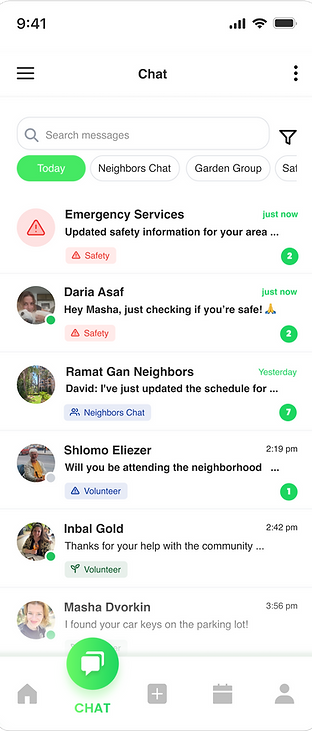
Inside a conversation, community members can coordinate plans, ask questions, and continue interacting after discovering or joining an activity.
The interface intentionally stays lightweight so the conversation remains the focus.

CONVERSATION
Focused communication without losing context.


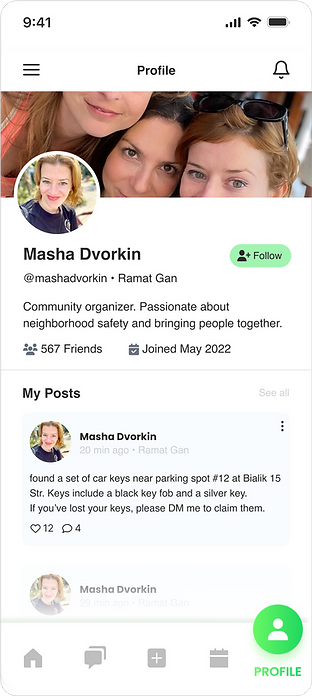
MORE SCREENS
Supporting the wider community experience.
Profile management, content creation, and editing tools allow residents to participate actively in the community.
These interactions support the wider product without competing with the primary Home experience.

ITERATION
A clearer hierarchy helped different neighborhood needs work together.
The initial concept presented alerts, utilities, news, events, conversations, and community content with similar visual weight.
This made it difficult to understand what required immediate attention and what could be explored later.
I refined the experience by:
-
Prioritizing urgent information when relevant
-
Grouping weather and shelters as practical utilities
-
Keeping common actions accessible from Home
-
Creating a dedicated Events experience
-
Connecting posts and conversations
-
Reducing competition between different content types
The product became clearer once each area had a defined role.
DESIGN SYSTEM
A flexible system for different kinds of local information.
MyHood required a visual system that could distinguish between urgent, practical, social, and exploratory content.
I created reusable patterns for:
-
Alert levels
-
Utility cards
-
Event cards
-
Category and filter chips
-
Location indicators
-
Community posts
-
Message components
-
Participant states
-
Primary and secondary actions
Consistent spacing, typography, and interaction patterns help users recognize different types of information quickly.
CONCEPT VALIDATION
Did the experience feel useful and easy to understand?
Early concept feedback explored whether participants could:
-
Identify important local information
-
Understand the purpose of the Home screen
-
Discover relevant activities
-
Move between updates, events, and community content
-
Imagine using the product regularly
Participants responded positively to the overall usefulness and described the interface as calm and easy to understand.
The feedback also reinforced the importance of maintaining a clear hierarchy so secondary content would not compete with urgent information.
FINAL EXPERIENCE
One starting point for everyday neighborhood life.
The final concept connects practical information, safety, local discovery, and community participation within one mobile experience.
MyHood helps residents move from:
“What is happening around me?”
to:
“I understand what matters and know what I can do next.”
9 core screens
Covering local updates, safety, events, conversations, content creation, and profiles.
4 connected needs
Information · Safety · Discovery · Connection
1 neighborhood companion
A clear starting point for understanding and participating in local life.
WHAT I LEARNED
Designing a neighborhood product requires more than bringing information together.
The real challenge was deciding what deserved attention first and how different local needs could coexist without overwhelming the user.
MyHood strengthened my understanding of information hierarchy, contextual prioritization, and designing flexible products that support both urgent and everyday moments.
The key principle became:
Help people understand what is happening, then make the next action easy.

